|
|

|
Creating Lara Outfits Page 1 |
| Page 1
- 2
- 3
- 4
- 5
- 6
- 7
- 8
- 9
- 10
- 11
- 12
- 13
- 14
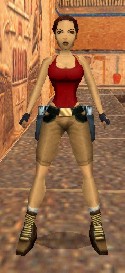
Getting Things Ready This Tutorial's purpose is give you enough information and the proper tools and software so that you can design your own custom outfits for Lara to wear. It is by no means a complete authority on designing outfits. It will, however, get you off to a good start and I leave it up to you to continue improving on the contents as well as your design skills. Before we get started it might be a good idea to make sure that you have all of the programs and tools necessary to complete this tutorial. There are two programs that you are going to need. If you already have them, then you won't need to download them again. The first program is TRwest Version 2.00. If you don't have this program you can download it from us by clicking on the link below. Also, you're going to need StrPix Version 3 Beta. If you already have these programs, please take a moment and use Windows Explorer to check the date of your Strpix3.exe file. The file date should be no earlier than 5/10/01. If it's older than this, or if you aren't sure, you can download the proper version on the link here. The web site for the TRwest program is itself the manual for the program. You should visit http://www.jps.net/mikejj/trwest/ and print out a copy of the web page. It's over 20 pages of valuable information. I would like to once again mention that you will find it of a great advantage to organize your files dealing with "Lara's Closet" as suggested here. If you do, it will make it much nicer when it comes to downloading files as well as communicating any problems you may be having back to me or others. Here's the suggested file structure. You should already have a...
folder. Create a folder inside the trle folder and name it "Laras Closet." Then, inside the "Laras Closet" folder, create an "Outfits" folder, a "Maps" folder, a "Workspace" folder, an "Original" folder, a "Starter" folder, and an "Preview" folder. You should then have...
When you have these created, you'll be ready to download our "Laras_Closet_Toolkit." This is a zipped file containing numerous files. Download the Toolkit and save it in your new "Laras Closet" folder. Then, go ahead and unzip the contents of this file into your "Laras Closet\Maps" folder. Since I'm sure that you're going to be curious about the files in your new toolkit, I'll take a moment to briefly mention what each is. Starter.TWS The "Starter.TWS" script file will be used to build the file "Starter.WAD". When you download an "outfit" from a web site they'll usually mention which level that the WAD file containing the outfit came from so that you'll know where to use it. For example they may tell you that it's the "city.WAD" and to use it to play the "City of The Dead" level. If you'll use our "Starter.WAD" file when you design your outfits, you'll be able to use Lara in any of her outfits in any of your levels! All of your outfit WADs will be the same except for what Lara is wearing. For example, if you create an outfit with Lara wearing a red wetsuit, you could name it "Red Wetsuit.WAD" and place it with your other Lara outfits. I'll show you later how to quickly use any of your Lara outfits in any level. Using this particular wad for your outfits also enables you to do the Tutorials. If you already have wads with other Lara outfits, see our Tutorial entitled "Converting Outfits to Starter Format." You'll learn how to quickly convert your existing outfits into our Starter format so that they can also be used in any level. Starter.bmp... Bitmap_Pg1.jpg... Bitmap_Key_Pg1.gif...
|